

About Ragdoll Hit Stickman
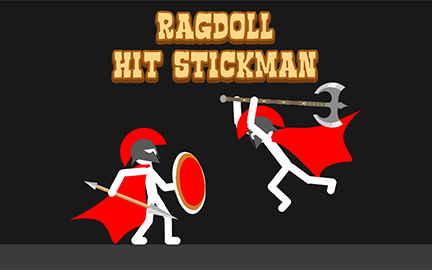
Ragdoll Hit Stickman is an action game in which the fighters' movement is shaped by ragdoll physics. Play single-player encounters, try survival mode, or challenge a friend. Each mode asks you to manage the same basic problem: move into a useful position while the character's momentum makes the next exchange less predictable.
Equipment choices and different maps add context to those encounters. Learn how your stickman responds before rushing toward the opponent. Once you can recognize when a movement leaves you exposed, you can make a more deliberate choice about when to approach or recover.
How to Play Ragdoll Hit Stickman
Choose a mode, learn its control layout, and use movement to engage the opponent while keeping track of your own position.
- Select single-player, survival, or the available two-player mode.
- Check the equipment and map options presented for the selected activity.
- Use the relevant movement keys to approach or reposition.
- Watch how the character responds during an exchange and regain a useful position.
- Continue toward the objective shown by the selected mode.
Controls & Timing
Movement needs a recovery plan
A direction input can carry a ragdoll farther than expected. Notice where your character ends up after approaching an opponent, then adjust the next input from that position rather than repeating the same movement automatically.
The objective changes by mode
Single-player encounters, a shared-screen match, and survival have different demands. In survival, the next opponent matters as well as the current exchange. In two-player mode, both players should check their separate controls before the round begins.
Controls
| Input | Action | When to use |
|---|---|---|
| A / D | Control the stickman | Single-player and survival; Player 1 in two-player mode. |
| Left / right arrows | Control Player 2 | Two-player mode. |
| In-game menus | Select available mode and equipment | Prepare for an encounter. |
Follow the on-screen prompts for any additional actions.
High Score Tips
- Practice a short approach. Use a small movement to see how the stickman reacts. The result helps you judge how much space you need near an opponent.
- Recover after contact. Look at your character's orientation and the remaining space before deciding whether to move in again.
- Read the map. Different layouts can change how much room you have to reposition. Establish a safe route before committing to a long approach.
- Watch beyond the current opponent in survival. In survival mode, multiple enemies attack in succession. Keep the next arrival in mind when choosing where to stand.
- Evaluate equipment in a familiar setting. Compare a new weapon or protective option while keeping the map or mode familiar enough to understand the difference.
Key Features
- Physics-driven fighters: Characters move and react with ragdoll motion.
- Single-player encounters: Face computer-controlled opponents.
- Survival mode: Continue against repeated opponents.
- Two-player mode: Two players use separate controls on the same screen.
- Equipment and maps: Choose from the available weapons and protective equipment.
Frequently Asked Questions
Can two people play on the same screen?
Yes. Player 1 uses A / D and Player 2 uses the left and right arrow keys.
Which mode should I try first?
Single-player is a useful place to learn the character's movement before adding another person's decisions or the repeated pressure of survival mode.
What is different about survival mode?
In survival mode, you face a stream of opponents. Consider your position after each encounter because another opponent may already be approaching.
Does equipment matter?
Weapons and protective equipment provide customization options. Compare an available choice in a familiar mode to see how it changes your approach.