
About Bow Battle
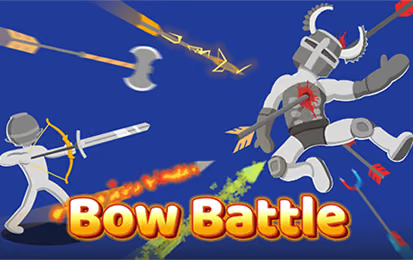
Bow Battle is an archery game built around aiming, shot power, and the effect of gravity. You drag to prepare a shot and release to fire; the arrow's path and the target's reactions make each follow-up a new decision. Different arrow types add variety to the way a duel plays out.
Play solo against computer opponents or take on Challenge Mode, which progresses through floors with random upgrades. A global leaderboard tracks high scores. Whether your current goal is to win a duel or advance through more floors, use each shot to learn how the aim and power affect the result.
How to Play Bow Battle
Choose a mode, draw your shot, and adjust your aim after observing where each arrow lands.
- Select a solo duel or Challenge Mode.
- Locate the opponent and consider the distance between you.
- Drag the mouse to adjust your aim and the power of the shot.
- Release the input to fire and watch the arrow's path.
- Use the result to refine your next shot, adapting to any available arrow type or upgrade.
Controls & Timing
Aim for an arc, not a straight line
Gravity affects the flight of an arrow. An aim that works at a short distance may need adjustment when the opponent is farther away. Watch where the arrow lands and make a measured change to the next shot.
Account for the target's reaction
Hits produce physics-driven movement, so the opponent may no longer be in the same position after a successful shot. Check the new position before drawing again. In Challenge Mode, random upgrades can also change the choices available as you move through floors.
Controls
| Input | Action | When to use |
|---|---|---|
| Drag the mouse | Adjust aim and shot power | Set up the arrow before firing. |
| Release the input | Fire | Shoot when your aim is ready. |
High Score Tips
- Read the arrow's path. A miss can show whether the shot fell short or traveled beyond the target.
- Make small adjustments. Change the aim or power deliberately so you can tell which correction helped.
- Recheck the target after a hit. Ragdoll reactions may alter its position before the next shot.
- Consider the arrow type. Different arrow types can change your approach, so try the options available to you.
- Adapt to upgrades. Challenge Mode provides random upgrades, so adjust your strategy to the options you actually receive.
- Practice consistency. In a solo duel, repeat a useful setup and refine it as the distance changes.
Key Features
- Mouse-drag aiming and power adjustment.
- Arrows affected by gravity and physics-driven reactions.
- Different arrow types that add variety to duels.
- Solo duels and a floor-based Challenge Mode.
- Random upgrades and a global leaderboard.
Frequently Asked Questions
How do I fire an arrow?
Drag the mouse to set the shot and release the input to fire.
Why does the arrow fall below my target?
Gravity affects the arrow's path. Adjust the angle or power and observe the next result.
What is Challenge Mode?
Challenge Mode takes you through floors with random upgrades.
Can I play a solo duel?
Yes. Single-player mode puts you against computer opponents.
Is there a leaderboard?
Yes. The game includes a global leaderboard for high scores.