

About Flip Or Fail
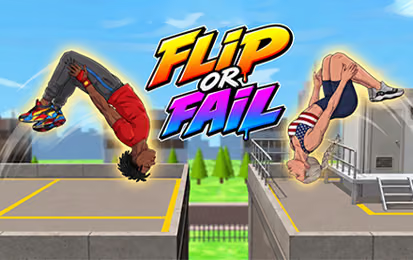
Flip Or Fail is a physics-based stunt game in which a jump is only the beginning of the challenge. After launching from a ramp or platform, you control the character's rotation and decide when to stop flipping. Extra tricks can improve a score, but they leave less time to prepare for the landing.
Try Classic, Arcade, and Challenge modes in environments such as the harbor, school, rooftop, and construction site. Unlock characters through progress, stars, and daily logins. Explore the available modes in the game and build consistency before trying a more ambitious stunt.
How to Play Flip Or Fail
Read the landing area, charge a jump, and stop rotating in time to meet the platform.
- Select an available stage and locate its target landing area.
- Hold the mouse to crouch and charge the jump.
- Release to launch from the starting platform.
- Hold again in the air to rotate, then release before landing.
- Use the result to adjust the charge or rotation on the next attempt.
Controls & Timing
Charge and launch
Holding the mouse prepares the jump; releasing it begins the flight. The distance and height of the target are useful cues when deciding how to approach the launch. Notice where the character travels before changing your timing for the next attempt.
Stop the flip in time
Holding again during flight adds rotation. A longer hold can create more tricks, but you still need to release before contact. Establish a reliable landing first, then experiment with extra rotation when the jump gives you enough time.
Controls
| Input | Action |
|---|---|
| Hold mouse before launch | Crouch and charge the jump. |
| Release | Launch. |
| Hold during flight | Rotate in the air. |
| Release before landing | Stop the rotation and prepare to land. |
High Score Tips
- Study the target. Its distance from the launch platform helps you judge the attempt.
- Master a simple landing first. A repeatable jump gives you a better basis for adding tricks.
- Release before the platform arrives. Give the character time to settle into a landing position.
- Change one timing at a time. Adjust either the launch or the rotation so you can see which change improves the result.
- Balance tricks against completion. Extra rotations may add points, but a crash can end the attempt.
- Use the mode progression. Unlock Arcade and Challenge stages through Classic progress and stars; check the menu for each requirement.
Key Features
- Charge, launch, rotate, and land using hold-and-release input.
- Physics-driven stunt attempts with score opportunities.
- Classic, Arcade, and Challenge modes.
- Several environments and unlockable characters.
- Increasingly demanding stage progression.
Frequently Asked Questions
How do I start a jump?
Hold the mouse to charge and release to launch.
How do I flip in the air?
Hold the mouse again during flight, then release before landing.
Do more tricks help my score?
Tricks can increase your score. Make sure there is still enough time to prepare a landing.
What modes are available?
Classic, Arcade, and Challenge modes offer stages unlocked through Classic progress and stars.
How do I unlock characters?
Unlock characters through progress, collected stars, and daily logins. Check the game for each character's current requirement.