

About Dude Theft Auto
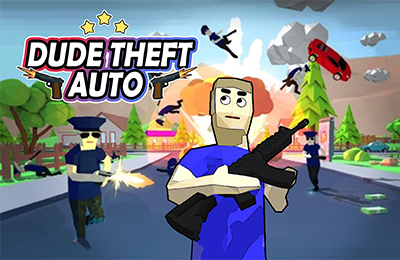
Dude Theft Auto is an open-world sandbox with a ragdoll presentation and several activities to explore. Explore city environments, use vehicles, interact with objects, and try optional tasks. You can choose to look around at your own pace or follow an available objective for a more directed session.
The range of choices is easier to approach with a short plan. Pick a location, learn how your current character or vehicle moves, and decide what you want to try after reaching it. If you take on a task, check its displayed instructions and reward before choosing what to do with the earnings.
How to Play Dude Theft Auto
Select an available mode or map, explore the surroundings, and choose an activity from the options you encounter.
- Enter an available world and identify the area where you start.
- Use WASD to move and look for a nearby destination or displayed task.
- Read the relevant prompts when interacting with a vehicle or object.
- Explore the chosen activity and observe how the current vehicle or character responds.
- Review any task reward and decide whether an available purchase supports your next plan.
Controls & Timing
On foot and in a vehicle
Use WASD to move and control vehicles. Treat a new vehicle as a different handling problem: make a short test in an open area before relying on the same turning or movement timing you used on foot.
Use the current interaction prompt
Approach a vehicle or item and follow the on-screen prompt to interact with it.
Controls
| Input | Action | When to use |
|---|---|---|
| WASD on foot | Move the character | Explore a neighborhood or approach an activity. |
| WASD in a vehicle | Control the current vehicle | Travel along a selected route. |
| Displayed interaction prompt | Use an available object or activity | Follow the current game's instructions. |
High Score Tips
Use these tips to find your way around the city and make the most of each activity.
- Set a nearby destination. A short route lets you learn landmarks and character movement without trying to understand the whole city at once.
- Practice a vehicle in space. Try turning and moving where there are fewer obstacles. Once its response is familiar, use it for a longer route.
- Read the displayed task. Identify the immediate objective before leaving the starting area so you know where to focus your attention.
- Choose a purchase for the next activity. Compare available vehicles or equipment with the task you intend to try instead of assuming every item serves the same purpose.
- Reassess after changing modes. A new map or activity can offer a different environment. Find your starting position and the current prompts before repeating a familiar route.
Key Features
- Open-world exploration: Choose a destination within the available city environment.
- Ragdoll presentation: Character movement contributes to the sandbox's physical interactions.
- Multiple activities: Explore or select tasks described by the game.
- Vehicles: Try different rides while navigating the map.
- Task rewards: Use earnings toward available vehicles or equipment.
Frequently Asked Questions
Do I have to follow a fixed mission order?
The city is an open sandbox with optional tasks and several activities. Choose a destination or a displayed task based on what you want to explore.
How do I move?
Use WASD to move your character and control vehicles. Read the current interaction prompt for actions such as entering a vehicle.
What are task rewards for?
Spend earned money on available vehicles, weapons, and equipment. Review the current choices and select an item that fits the activity you want to try.
How should I learn a new vehicle?
Try a short route with room to turn, then observe how the vehicle responds. A familiar area makes it easier to compare the new ride with your previous one.